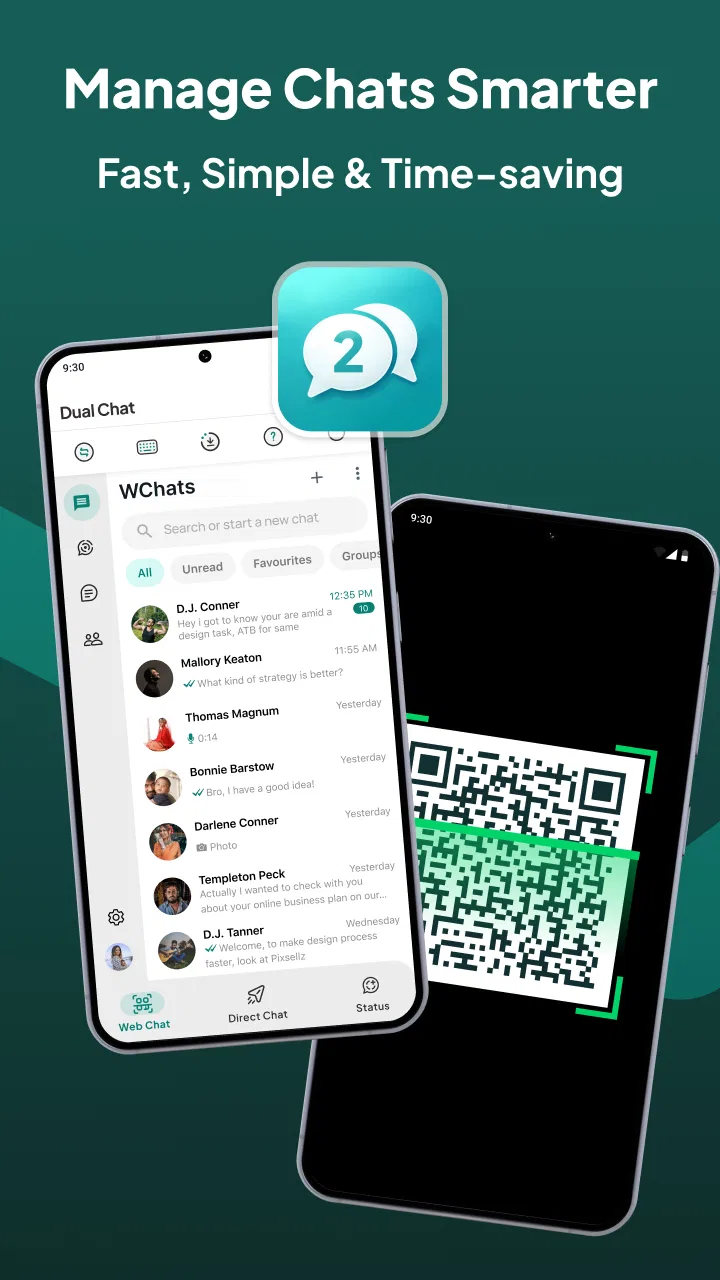
Web Scan & Dual Chat App
- 4.5
- Rating
- 10.00K
- Installs
- Free
- Price

 Analysis by App-foxy
Managing more than one chat account on the same phone sounds simple until everyday conversations begin colliding. Work messages, personal chats, family groups, and temporary sessions can all demand attention at once. Web Scan & Dual Chat is built for that particular problem: it is a communication app from Vasundhara Infotech LLC that brings account management and web-based chat access into one mobile workflow. I found its appeal less about replacing a familiar messenger and more about reducing the need to keep switching between separate places.
The app is free to install and is rated for Everyone, which makes it approachable for a wide range of users. Its store summary focuses on managing multiple accounts and chats from one device, while the shorter description points to web scanning and dual chat. Those two ideas are important because they explain who will benefit most: people who regularly move between accounts, rather than someone looking for a completely new social network or a full-featured standalone messenger.
My overall view is positive, but conditional. This is most useful when account separation is your daily problem, not when you only need occasional messaging. The convenience becomes noticeable after repeated use, especially when you want to keep a personal and professional chat environment available without carrying another phone. At the same time, any app that sits between you and web-based conversations deserves a careful look at setup, privacy habits, notifications, and the practical effort of maintaining another layer in your communication routine.
You May Also Like

 AccuWeather: Weather Radar
AccuWeather Review: A Quick, Clear Forecast for Everyday Decisions
For everyday plans, the best forecast is the one you can understand quickly. AccuWeather makes rain timing, radar, and local conditions easy to act on, with a few trade-offs.

 Hill Climb Racing
Why Hill Climb Racing Still Turns Crashes Into One More Run
A tiny car, a bumpy hill and one more upgrade: Hill Climb Racing keeps resurfacing because its simple chaos makes every near-miss feel personal.

 AliExpress - Shopping App
AliExpress Makes Global Shopping Feel Personal, but Shoppers Bear the Risk
AliExpress turns a global marketplace into a pocket-sized discovery engine. Its reach is useful, its shopping loop compelling, and its trade-offs easy to miss.

 Lords Mobile: Kingdom Wars
Lords Mobile Is a Kingdom-Building Routine, Not a Quick Match
A case-by-case verdict on the building, battles, device demands, and social commitments that make Lords Mobile rewarding for some players and exhausting for others.

 PDF Scanner app - TapScanner
TapScanner Makes Paperwork Easier to Capture, Check, and Share
TapScanner makes scanning with a phone feel less like a rescue operation and more like a dependable step in getting work done. Its capture tools are useful, though not flawless.

 Block Blast!
 Shows How Much a Puzzle Game Can Leave Out
A quiet grid game shows why puzzle players increasingly value instant clarity, repeatable skill and low-pressure play—and where the genre still needs to catch up.
More From Our News Desk
View All News


How I would decide whether it fits
I’d judge the fit by tracking how often separate chat identities interrupt your day, then trying the scan-and-switch routine with one secondary account before moving anything important over. That small trial can show whether the convenience outweighs the extra session checks and setup. The next question is how that trade-off compares with the alternatives already available on your phone.
Start with the account problem, not the feature list
The first question I would ask a friend is how often they change accounts. If the answer is “several times a day,” Web Scan & Dual Chat has a clear reason to exist. A person who runs a small business from a separate chat account, for example, may want work conversations available beside personal ones. A student might use one account for classmates and another for family. Someone who helps manage a relative’s messages could also value a second chat space without signing out of the main one each time.
If you rarely use more than one account, the extra layer may not justify itself. The usual official messaging app is generally the simpler option for one account because it avoids an additional setup step and keeps the experience closer to the service’s own design. Web Scan & Dual Chat should therefore be judged by the time it saves during account switching, not by whether it adds a new way to send ordinary messages.
What web scanning changes in real use
The web-scan approach is practical when your phone is the device you use to authorize or organize a chat session, while a larger screen is useful for reading and typing. I can see the benefit when handling long work conversations, copying information between documents, or keeping a group discussion visible while doing another task on a computer. The value is not just “more chats”; it is the ability to make a multi-account routine feel less fragmented.
There is also a trade-off. A scan-based connection usually means that the first setup deserves attention rather than a rushed tap-through. I would check which account is active before scanning, confirm that the displayed session belongs to the intended device, and remove sessions that are no longer needed. This is one of the less obvious habits that makes the app safer and less confusing: treat every connected web chat as an active doorway, not as a permanent background setting.
Compatibility and expectations
The current release is version 1.9 and works on Android 7.0 or later. That gives it a broad reach across older Android phones, although the experience will still depend on the phone’s memory, notification behavior, and the messaging services being accessed. I would not interpret the minimum operating-system requirement as a promise that every older device will feel equally smooth. A phone that already struggles with several running apps may make account management feel less seamless.
The app has passed the early-discovery stage with a 4.5 average from around 4.7 thousand ratings and more than 10 thousand installs. Those figures suggest that the concept is resonating with a real audience, but I would still read recent user feedback before making it the center of a work-critical communication setup. A high average can tell you that many people like the idea and general experience; it cannot replace testing the exact accounts and notification patterns you rely on.
A realistic day with the app
Imagine starting the morning with a personal account and a separate account for a small online shop. A customer asks about an order while a family group is active, and both conversations arrive during the same commute. With a dual-chat workflow, I would first identify the account associated with each conversation, answer the customer without opening the wrong profile, and then return to personal messages. Later, at a desk, I could use the web-scan route for longer replies instead of repeatedly picking up the phone.
The important benefit in that scenario is not speed in every individual message. It is reduced mental friction. I am less likely to answer from the wrong account, overlook a work request while browsing personal chats, or repeatedly log in and out. The app becomes worthwhile when those small interruptions happen often enough to affect the day.
Three habits that make the setup more reliable
- Label your accounts mentally before opening a chat. Use a consistent order, such as personal first and work second, so the visual arrangement becomes easier to recognize.
- Keep a short session checklist. After scanning for web access, verify the account name and device context before handling private or business conversations.
- Separate notification decisions from account decisions. If alerts become distracting, adjust which conversations deserve immediate attention rather than assuming the dual-chat setup itself is the problem.
These are simple steps, but they address the main risk of convenience tools: once switching becomes easier, it is tempting to connect everything and stop checking context. The better workflow is selective. I would add only the accounts I genuinely use and review active sessions whenever I change phones, lend a computer to someone, or stop using an account.
Where it wins, where other choices fit, and what switching costs
The key comparison is not simply which option offers more functions, but which one keeps account boundaries clear without adding chores. I’d weigh Web Scan & Dual Chat against the official app, any built-in account separation on the phone, and a desktop client based on where I actually handle conversations. That makes the practical costs of switching—relearning routines, checking sessions, and managing alerts—easier to assess.
The strongest advantage is concentrated convenience
Web Scan & Dual Chat wins over the standard one-account routine when the user has a repeatable need for parallel access. It can also be more comfortable than carrying a second phone, particularly for people who want one device in their pocket and a larger workspace when available. That makes it a sensible category choice for independent sellers, freelancers, families coordinating several accounts, and anyone who regularly separates communication by role.
Another strength is that the concept is easy to understand. You do not need to learn a new social network, build a profile, or persuade contacts to move elsewhere. The app’s purpose is operational: help you reach the chats you already use in a more flexible arrangement. For a friend who says, “I only need my existing conversations organized better,” that is a more relevant advantage than a long list of unrelated extras.
When the official app is the better answer
I would choose the official messaging application alone when privacy sensitivity, maximum simplicity, or dependable service support matters more than parallel access. The official route usually has the fewest moving parts and is the easiest place to troubleshoot account verification, notifications, backups, and security questions. If you use one account and do not need web scanning, adding a separate utility may create work instead of removing it.
I would also be cautious about using a dual-chat tool as the only channel for urgent business communication before testing it through a normal day. Notifications can be affected by phone settings, battery controls, or the behavior of the underlying chat service. I would keep the original app available until I knew that incoming messages, account switching, and web sessions behaved as expected on my device.
When a dedicated multi-account solution may fit better
Some Android phones include built-in app duplication or work-profile tools. If your phone offers a dependable native option, that may be preferable for people who want account separation at the operating-system level. The advantage is not automatically that it has more features; it is that the separation may feel more integrated with the phone’s settings and security controls. Web Scan & Dual Chat is more attractive when you specifically want its scan-and-chat workflow rather than simple duplication.
There is also a category of full desktop messaging clients. Those can be a better match for someone whose main activity happens at a computer and who needs extensive organization, keyboard shortcuts, or a unified desktop inbox. I would not expect a mobile-focused dual-chat utility to replace a mature desktop workspace for a support team or a large operation. Its sweet spot is personal, small-business, and household use where convenience matters but enterprise-level administration does not.
Privacy and account discipline
Because this app helps manage access to existing chats, I would pay attention to the same practical security habits I use with any account-management tool. I would avoid scanning a code on a public computer, lock the phone, use screen protection, and sign out of sessions that no longer serve a purpose. I would also avoid assuming that “dual” means completely isolated: the phone, notifications, screenshots, and recent-apps view can still expose information if the device itself is shared.
This is a genuine limitation rather than a reason to reject the app. Convenience and separation are not identical. The app can make accounts easier to reach, but the user still has to maintain boundaries between them. For sensitive work, I would use a dedicated work profile or a company-approved solution if one is required. For ordinary personal and small-business separation, careful device habits may be enough.
What the price means over time
The app is free, but it includes in-app purchases ranging from $5.99 to $69.99 per item. I would not pay immediately just because a premium prompt appears. First, I would confirm that the free experience handles the account arrangement I actually need and that the workflow is comfortable on my phone. Then I would decide whether an optional purchase removes a real obstacle rather than paying for features I may never use.
This pricing structure changes the cost-of-switching question. The initial financial barrier is low, but the bigger cost is time: setting up accounts, learning the scan routine, checking sessions, and changing notification habits. If the app saves that effort every day, it can be worthwhile. If I only need a second account once a month, the setup and maintenance may feel heavier than simply using the official app when necessary.
Who should install it, and who should skip it
I would recommend trying Web Scan & Dual Chat if you regularly manage separate personal and work identities, need access to more than one chat environment, or often move between a phone and a computer. It is especially appealing when carrying a second device is inconvenient and when your conversations are active enough that repeated sign-ins interrupt your routine.
I would skip it if you use one account, dislike web-based setup, need a strictly managed business environment, or prefer to keep every communication task inside the official app. I would also avoid making it the first choice for a shared family phone unless everyone understands which accounts are connected and how to end sessions. In those cases, native account separation or a dedicated device may be clearer.
My recommendation after weighing the trade-offs
My recommendation is to treat this as a focused communication utility, not a universal replacement for messaging apps. Vasundhara Infotech LLC has aimed it at a recognizable pain point, and the dual-chat concept can genuinely simplify a multi-account day. The free entry point makes testing straightforward, while the Everyone content rating keeps it accessible to a broad audience.
I would begin with one secondary account, use the app through a normal workday, and test the moments that matter: switching without confusion, receiving alerts, scanning from a trusted computer, and ending a session cleanly. If those steps feel natural, adding another account may be reasonable. If the process feels slower than opening the official app, that answer is useful too.
For me, the deciding factor is frequency. People with a real, repeated need for parallel chats should give it a try; people with a single-account routine should stay with the simpler official option. That is a narrower recommendation than calling it essential, but it is also the honest one. Web Scan & Dual Chat earns its place when it removes account-switching friction every day, and it becomes unnecessary when that friction barely exists.
FAQs for Web Scan & Dual Chat App
01What is Web Scan & Dual Chat App used for?
Web Scan & Dual Chat App is designed to provide access to a second chat session through a web-style scanning feature. It can be useful when you want to manage another account or view conversations on a larger screen, depending on the supported messaging service. Before downloading, check the app description carefully to understand which platforms it supports and whether all advertised features are available on your device.
02Is Web Scan & Dual Chat App an official messaging application?
No, Web Scan & Dual Chat App should generally be treated as a companion or third-party utility rather than the official application of the messaging service it connects to. It does not replace the original chat app and may rely on web-session functionality. Users should review the developer information, privacy policy, permissions, and store reviews before signing in or connecting an account.
03Can I use two chat accounts with Web Scan & Dual Chat App?
The app is intended to help users access or manage a second chat account, but the exact behavior depends on the supported service and device. Some features may allow a separate web session, while others may only mirror an existing account. You may need to scan a QR code or confirm access from the primary phone, so keep both devices nearby during setup.
04Is my information safe when using Web Scan & Dual Chat App?
Safety depends on how the app handles sessions, permissions, and connected account data. Avoid entering passwords directly unless the official service provides a secure login screen, and never share verification codes with anyone. Before use, inspect the requested permissions, privacy policy, developer reputation, and account-management options. Always log out of linked sessions from the official messaging app when finished.
05What should I check before downloading Web Scan & Dual Chat App?
Before installing Web Scan & Dual Chat App, confirm that your Android or iOS version is supported, the application comes from a trustworthy store listing, and the developer provides clear privacy information. Check recent user reviews for connection problems, advertisements, battery usage, and account access concerns. Also verify whether the dual-chat feature is genuinely supported on your device rather than simply advertised.
Pros
- Quickly scans QR codes and WhatsApp Web sessions from one device.
- Dual-chat support helps separate personal and work conversations.
- Simple interface makes pairing and navigation easy for most users.
- Useful for checking linked sessions and spotting unfamiliar devices.
- Supports convenient access to chats when using a tablet or secondary phone.
Cons
- Requires an active internet connection on both paired devices.
- May expose private conversations if the secondary device is shared.
- Session access can stop when the primary account logs out or disconnects.
- Some features may be limited by WhatsApp updates or compatibility issues.
- Contains ads or optional purchases that may affect the overall experience.

Web Scan & Dual Chat App
Gallery